
Tools & batch
Data charts, stateless re-generation, multi-slide carousels, animated GIFs, bulk generation, and pattern discovery: full parity with everything the Studio web app can do.
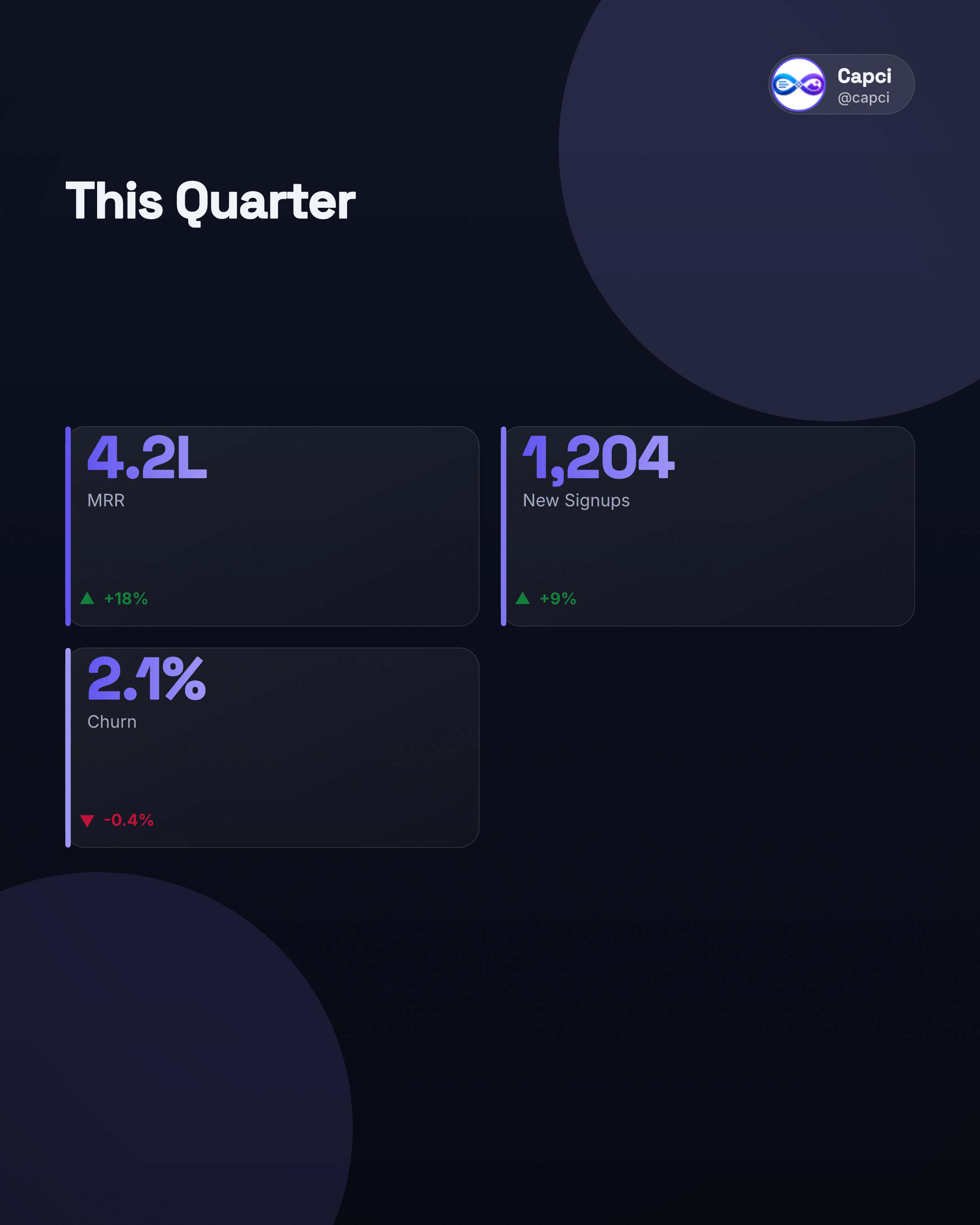
Generates a bar/line/donut/KPI chart from data you supply: deterministic, no additional AI call, so it's fast and repeatable.
| Field | Type | Description & options |
|---|---|---|
| chartType | Required | bar, line, donut, or kpi. |
| title / subtitle / unit | String | Chart headline, sub-headline, and an optional unit label (e.g. '$', 'users'). |
| series | Array | bar/line only: flat [{label, value}] array, 2-12 points. |
| slices | Array | donut only: flat [{label, value}] array, 2-8 points. |
| tiles | Array | kpi only: [{value, label, delta?, deltaDirection?}], 1-6 tiles. |
| size | String | Canvas aspect ratio. portraitlandscapesquarestory |
| theme | String | Color mode. light (default)dark |
| style | String | Visual skin. glass (default)flatblueprinteditorial |
| palette | Object | { primary, secondary, bg } hex override for this chart only. |
| brand | Object | Per-request branding override. |
curl -X POST https://api.capci.app/api/v1/chart \
  -H "x-api-key: capci_your_api_key" -H "Content-Type: application/json" \
  -d '{
    "chartType": "bar",
    "title": "Quarterly Signups",
    "series": [
      {"label":"Q1","value":120},{"label":"Q2","value":210},
      {"label":"Q3","value":340},{"label":"Q4","value":480}
    ],
    "theme": "dark"
  }'

# donut → use "slices" (same {label, value} shape)
# kpi → use "tiles": [{"value":"4.2L","label":"MRR","delta":"+18%","deltaDirection":"up"}]Re-generate content you already hold (from a prior /posts or /chart response) with a different theme, size, or brand: no additional AI call, no charge. Great for reskinning without spending another plan call.
| Field | Type | Description & options |
|---|---|---|
| format | Required | Which pattern this content belongs to (also accepts pattern, so a /posts response can be passed back in unmodified). |
| content | Required | The content object from a prior response, optionally edited. |
| size | String | Override the canvas aspect ratio. |
| theme | String | Override the color mode. |
| brand | Object | Override branding for this re-render only. |
curl -X POST https://api.capci.app/api/v1/render \
  -H "x-api-key: capci_your_api_key" -H "Content-Type: application/json" \
-d '{ "format": "listicle", "content": { ... }, "theme": "light", "size": "story" }'Plans a multi-slide swipeable carousel and returns each slide plus an assembled PDF. Portrait or square only.
| Field | Type | Description & options |
|---|---|---|
| prompt | Required | The topic to build a carousel about. |
| size | String | Canvas aspect ratio (carousels don't support landscape/story). portrait (default)square |
| theme | String | Color mode. light (default)dark |
| style | String | Visual skin. glass (default)flatblueprinteditorial |
| brand | Object | Per-request branding override. |
curl -X POST https://api.capci.app/api/v1/carousel \
  -H "x-api-key: capci_your_api_key" -H "Content-Type: application/json" \
  -d '{ "prompt": "5 simple ways to save more money every month", "size": "portrait" }'
# → { "pattern": "carousel", "images": ["data:image/png;base64,…", ...], "pdf": "data:application/pdf;base64,…", "content": { "slides": [...] } }Re-generate an edited slide array from a prior /carousel call: no additional AI call, no charge.
| Field | Type | Description & options |
|---|---|---|
| slides | Required | The (possibly edited) content.slides array from a prior /carousel response — not that response's top-level images. |
| theme | String | Override the color mode. light (default)dark |
| size | String | Override the canvas aspect ratio. portrait (default)square |
# "slides" here is content.slides from a prior /carousel response — the editable
# slide-object array, NOT that response's top-level "images" (rendered PNGs)
curl -X POST https://api.capci.app/api/v1/carousel/render \
  -H "x-api-key: capci_your_api_key" -H "Content-Type: application/json" \
-d '{ "slides": [ ... ], "theme": "dark", "size": "portrait" }'Turns content you already hold (or an existing diagram) into a reveal GIF. Offloads to an async job (poll GET /api/v1/jobs/{id}) for larger renders; otherwise generates inline and returns the GIF directly. Two input modes, pick one.
| Field | Type | Description & options |
|---|---|---|
| format | String | Which pattern this content belongs to. Required together with content; omit when using diagramId. |
| content | Object | The content object to animate. Required together with format; omit when using diagramId. |
| diagramId | String | Animate an existing diagram from /api/v1/diagrams instead of raw content. Cannot be combined with format/content. |
| anim | String | Animation style: flow reveals along the connections/edges, build reveals elements in sequence. flow (default)build |
| speed | String | Playback speed. slownormal (default)fast |
| size | String | Override the canvas aspect ratio. |
| brand | Object | Per-request branding override (ignored when animating an existing diagramId, since it keeps its own saved brand). |
# Mode 1 — animate content you already hold (from a prior /posts or /chart call)
curl -X POST https://api.capci.app/api/v1/animate \
  -H "x-api-key: capci_your_api_key" -H "Content-Type: application/json" \
  -d '{ "format": "listicle", "content": { ... }, "anim": "flow", "speed": "normal" }'
# → { "async": true, "jobId": "…" }  when offloaded — poll GET /api/v1/jobs/{jobId}
# → { "gif": "data:image/gif;base64,…" }  when generated inline (small/fast payloads)

# Mode 2 — animate an existing diagram by id instead (mutually exclusive with format/content)
curl -X POST https://api.capci.app/api/v1/animate \
  -H "x-api-key: capci_your_api_key" -H "Content-Type: application/json" \
-d '{ "diagramId": "DIAGRAM_ID", "anim": "flow", "speed": "fast" }'Bulk / data-merge: one format + a shared base + up to 200 items → N async generations in a single call, billed once for the whole valid batch. If bulk generation is temporarily unavailable, you'll get a 503 batch_unavailable; retry shortly.
| Field | Type | Description & options |
|---|---|---|
| format | Required | Any single-image format (not carousel: no multi-slide support in batch). |
| base | Object | Fields shared by every item. |
| items | Required | Array of per-item overrides merged onto base, up to 200. |
| theme | String | Color mode, applied to every item. light (default)dark |
| size | String | Canvas aspect ratio, applied to every item. portraitlandscapesquarestory |
| brand | Object | Branding override, applied to every item. |
curl -X POST https://api.capci.app/api/v1/batch \
  -H "x-api-key: capci_your_api_key" -H "Content-Type: application/json" \
  -d '{
    "format": "cover",
    "base": { "subtitle": "Q3 2026" },
    "items": [ { "title": "Region A" }, { "title": "Region B" } ]
  }'
# → { "batchId": "…", "total": 2, "skipped": [], "jobIds": [...] }
# poll GET /api/v1/jobs/batch/{batchId}Poll status for an async job created by /animate or /batch. Returns { status: 'queued' | 'rendering' | 'done' | 'failed' } while pending, plus the image(s) once done. Not subject to the 20/min generation rate limit, so poll every 2-3s.
# Single job (from /animate)
curl https://api.capci.app/api/v1/jobs/JOB_ID -H "x-api-key: capci_your_api_key"

# Batch (from /batch)
curl https://api.capci.app/api/v1/jobs/batch/BATCH_ID -H "x-api-key: capci_your_api_key"Lists every post format id with its human-readable title and the exact content schema it expects: the machine-readable counterpart to the format pills on the Posts page. Useful if you're building your own prompt/format picker UI against this API.
curl https://api.capci.app/api/schemas -H "x-api-key: capci_your_api_key"